
API Reference
Read and manage your store programmatically — inventory, orders, customers, campaigns, and pricing. 38 endpoints, grouped the same way your dashboard is.
Read and manage your store programmatically — inventory, orders, customers, campaigns, and pricing. 38 endpoints, grouped the same way your dashboard is.
npm i @shadow-software/dabdash-sdkrequire shadow-software/dabdash-sdkThe full machine-readable spec behind this page — import it into any API client.
Download specEvery request needs an API token. Create one from your store's dashboard under Settings → AI Assistant, then send it as a bearer token. Read-only tokens can call read endpoints only; read & write tokens can call all of them.
Authorization: Bearer YOUR_API_TOKEN
Every endpoint belongs to one area and one access level, written
area:access — for example
catalog:read or
marketing:write. The downloadable spec lists the scope every endpoint needs.
read
Grants :read on every area. Cannot change any data.
read_write
Grants :read and :write on every area.
Areas:
Every endpoint is a POST request to
https://{your-store-slug}.dabdash.com/api/v1/tools/{tool}
— your own store's subdomain or mapped custom domain. This API is never served from
dabdash.com itself.
Every endpoint follows this shape — swap the tool name and the body. Here's
inventory_status, which check inventorys across your store.
curl -X POST "https://{your-store-slug}.dabdash.com/api/v1/tools/inventory_status" \
  -H "Authorization: Bearer YOUR_API_TOKEN" \
  -H "Content-Type: application/json" \
  -d '{
      "alert_only": true
}'import { DabDash } from '@shadow-software/dabdash-sdk';
const dabdash = new DabDash({ token: process.env.DABDASH_API_TOKEN });
const result = await dabdash.tools.inventory_status({
"alert_only": true
});use ShadowSoftware\DabDash\DabDashClient;
$dabdash = new DabDashClient(token: $_ENV['DABDASH_API_TOKEN']);
$result = $dabdash->tools()->inventoryStatus([
'alert_only' => true,
]);Everything on this page is also available to an AI assistant, using the same token and the same permissions — with no code at all. Connect one and you can just ask.
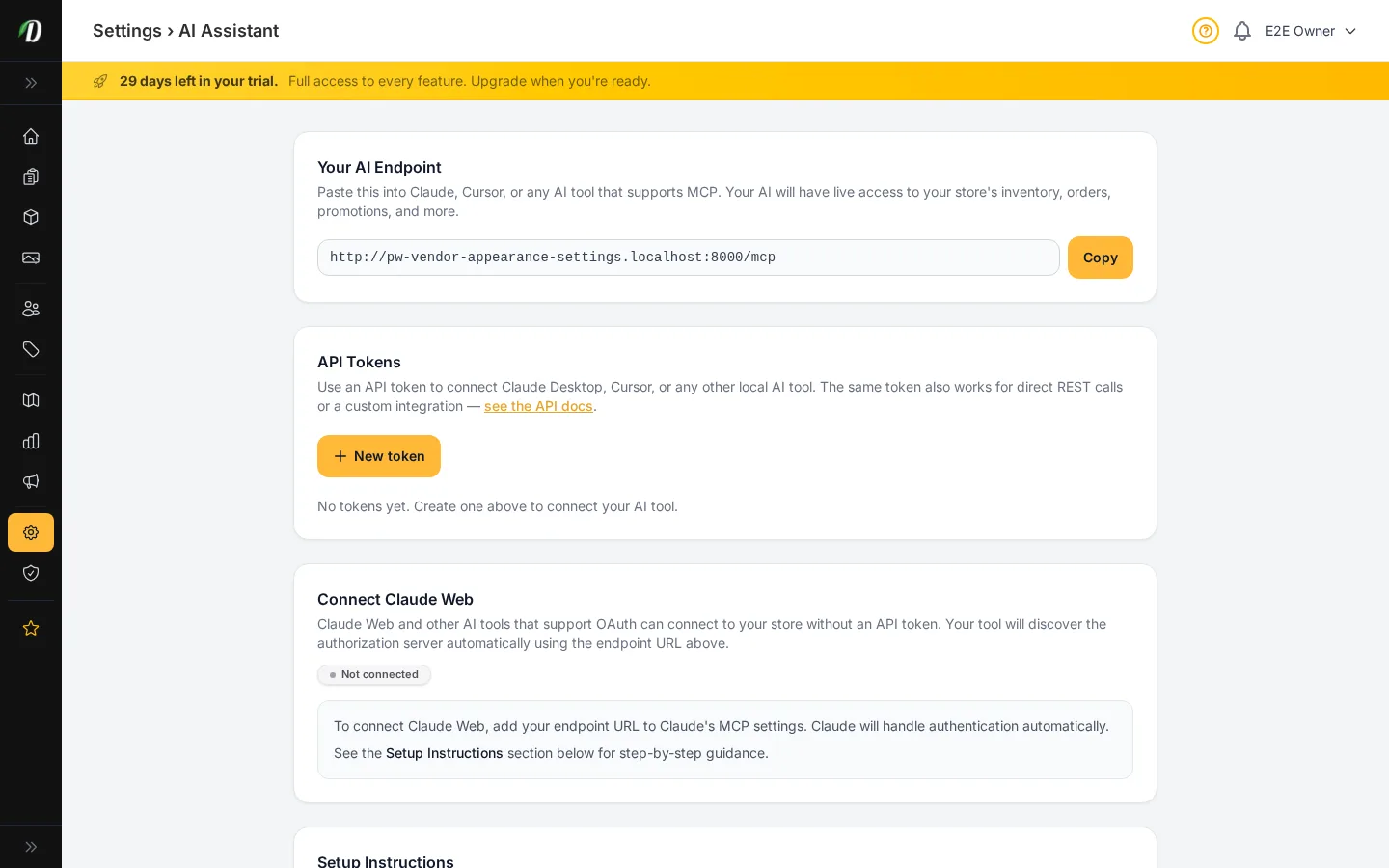
https://{your-store-slug}.dabdash.com/mcp
That's the shape. Your own address is ready to copy in your dashboard under Settings → AI Assistant.
Read the setup guideWant every endpoint, parameter, and response shape? Download the full spec and import it into your API client.
Identify the connected store and check its subscription state.
curl -X POST "https://{your-store-slug}.dabdash.com/api/v1/tools/store_info" \
  -H "Authorization: Bearer YOUR_API_TOKEN" \
  -H "Content-Type: application/json" \
  -d '{}'
import { DabDash } from '@shadow-software/dabdash-sdk';
const dabdash = new DabDash({ token: process.env.DABDASH_API_TOKEN });
const result = await dabdash.tools.store_info({});use ShadowSoftware\DabDash\DabDashClient;
$dabdash = new DabDashClient(token: $_ENV['DABDASH_API_TOKEN']);
$result = $dabdash->tools()->storeInfo();Read orders, their status, and delivery details.
Exact order number (optional)
Exact customer email (optional)
Customer phone number, digits or formatted (optional)
Filter by order status: pending, confirmed, preparing, out_for_delivery, delivered, cancelled
Filter by payment status: pending, paid, failed, refunded
Start date filter (YYYY-MM-DD format)
End date filter (YYYY-MM-DD format)
Minimum order total in cents
Number of orders to return (default 25, max 100)
| Name | Type | Required | Description |
|---|---|---|---|
| order_number | string | optional | Exact order number (optional) |
| customer_email | string | optional | Exact customer email (optional) |
| customer_phone | string | optional | Customer phone number, digits or formatted (optional) |
| status | string | optional | Filter by order status: pending, confirmed, preparing, out_for_delivery, delivered, cancelled |
| payment_status | string | optional | Filter by payment status: pending, paid, failed, refunded |
| date_from | string | optional | Start date filter (YYYY-MM-DD format) |
| date_to | string | optional | End date filter (YYYY-MM-DD format) |
| min_total | integer | optional | Minimum order total in cents |
| limit | integer | optional | Number of orders to return (default 25, max 100) |
curl -X POST "https://{your-store-slug}.dabdash.com/api/v1/tools/order_dashboard" \
  -H "Authorization: Bearer YOUR_API_TOKEN" \
  -H "Content-Type: application/json" \
  -d '{
      "order_number": "example",
      "customer_email": "example",
      "customer_phone": "example"
  }'
import { DabDash } from '@shadow-software/dabdash-sdk';
const dabdash = new DabDash({ token: process.env.DABDASH_API_TOKEN });
const result = await dabdash.tools.order_dashboard({
"order_number": "example",
"customer_email": "example",
"customer_phone": "example"
});use ShadowSoftware\DabDash\DabDashClient;
$dabdash = new DabDashClient(token: $_ENV['DABDASH_API_TOKEN']);
$result = $dabdash->tools()->orderDashboard([
'order_number' => 'example',
'customer_email' => 'example',
'customer_phone' => 'example',
]);Products, variations, categories, stock levels, and price menus.
If true, return only low-stock and out-of-stock items (default false)
| Name | Type | Required | Description |
|---|---|---|---|
| alert_only | boolean | optional | If true, return only low-stock and out-of-stock items (default false) |
curl -X POST "https://{your-store-slug}.dabdash.com/api/v1/tools/inventory_status" \
  -H "Authorization: Bearer YOUR_API_TOKEN" \
  -H "Content-Type: application/json" \
  -d '{
      "alert_only": true
  }'
import { DabDash } from '@shadow-software/dabdash-sdk';
const dabdash = new DabDash({ token: process.env.DABDASH_API_TOKEN });
const result = await dabdash.tools.inventory_status({
"alert_only": true
});use ShadowSoftware\DabDash\DabDashClient;
$dabdash = new DabDashClient(token: $_ENV['DABDASH_API_TOKEN']);
$result = $dabdash->tools()->inventoryStatus([
'alert_only' => true,
]);Exact product id (optional if name_query or sku supplied)
Partial product name match (optional if product_id or sku supplied)
Exact SKU of a variation belonging to the product (optional if product_id or name_query supplied). SKUs are unique per tenant.
| Name | Type | Required | Description |
|---|---|---|---|
| product_id | integer | optional | Exact product id (optional if name_query or sku supplied) |
| name_query | string | optional | Partial product name match (optional if product_id or sku supplied) |
| sku | string | optional | Exact SKU of a variation belonging to the product (optional if product_id or name_query supplied). SKUs are unique per tenant. |
curl -X POST "https://{your-store-slug}.dabdash.com/api/v1/tools/product_inspect" \
  -H "Authorization: Bearer YOUR_API_TOKEN" \
  -H "Content-Type: application/json" \
  -d '{
      "product_id": 10,
      "name_query": "example",
      "sku": "example"
  }'
import { DabDash } from '@shadow-software/dabdash-sdk';
const dabdash = new DabDash({ token: process.env.DABDASH_API_TOKEN });
const result = await dabdash.tools.product_inspect({
"product_id": 10,
"name_query": "example",
"sku": "example"
});use ShadowSoftware\DabDash\DabDashClient;
$dabdash = new DabDashClient(token: $_ENV['DABDASH_API_TOKEN']);
$result = $dabdash->tools()->productInspect([
'product_id' => 10,
'name_query' => 'example',
'sku' => 'example',
]);curl -X POST "https://{your-store-slug}.dabdash.com/api/v1/tools/catalog_flattening_audit" \
-H "Authorization: Bearer YOUR_API_TOKEN" \
-H "Content-Type: application/json" \
-d '{}'import { DabDash } from '@shadow-software/dabdash-sdk';
const dabdash = new DabDash({ token: process.env.DABDASH_API_TOKEN });
const result = await dabdash.tools.catalog_flattening_audit({});use ShadowSoftware\DabDash\DabDashClient;
$dabdash = new DabDashClient(token: $_ENV['DABDASH_API_TOKEN']);
$result = $dabdash->tools()->catalogFlatteningAudit();List of product IDs to look up.
ISO8601 timestamp. The last quantity_after strictly BEFORE this moment is returned for each variation. Example: "2026-05-03T00:00:00Z".
| Name | Type | Required | Description |
|---|---|---|---|
| product_ids | array | required | List of product IDs to look up. |
| cutoff_iso | string | required | ISO8601 timestamp. The last quantity_after strictly BEFORE this moment is returned for each variation. Example: "2026-05-03T00:00:00Z". |
curl -X POST "https://{your-store-slug}.dabdash.com/api/v1/tools/inventory_audit_lookup" \
  -H "Authorization: Bearer YOUR_API_TOKEN" \
  -H "Content-Type: application/json" \
  -d '{
      "product_ids": [],
      "cutoff_iso": "example"
  }'
import { DabDash } from '@shadow-software/dabdash-sdk';
const dabdash = new DabDash({ token: process.env.DABDASH_API_TOKEN });
const result = await dabdash.tools.inventory_audit_lookup({
"product_ids": [],
"cutoff_iso": "example"
});use ShadowSoftware\DabDash\DabDashClient;
$dabdash = new DabDashClient(token: $_ENV['DABDASH_API_TOKEN']);
$result = $dabdash->tools()->inventoryAuditLookup([
'product_ids' => [],
'cutoff_iso' => 'example',
]);The group to merge, exactly as returned by catalog_flattening_audit (e.g. "GLITTER BOMB | TOP SHELF FLOWER").
Defaults to TRUE — shows the plan without changing anything. Pass false to actually merge.
| Name | Type | Required | Description |
|---|---|---|---|
| base_name | string | required | The group to merge, exactly as returned by catalog_flattening_audit (e.g. "GLITTER BOMB | TOP SHELF FLOWER"). |
| dry_run | boolean | optional | Defaults to TRUE — shows the plan without changing anything. Pass false to actually merge. |
curl -X POST "https://{your-store-slug}.dabdash.com/api/v1/tools/catalog_collapse" \
  -H "Authorization: Bearer YOUR_API_TOKEN" \
  -H "Content-Type: application/json" \
  -d '{
      "base_name": "example",
      "dry_run": true
  }'
import { DabDash } from '@shadow-software/dabdash-sdk';
const dabdash = new DabDash({ token: process.env.DABDASH_API_TOKEN });
const result = await dabdash.tools.catalog_collapse({
"base_name": "example",
"dry_run": true
});use ShadowSoftware\DabDash\DabDashClient;
$dabdash = new DabDashClient(token: $_ENV['DABDASH_API_TOKEN']);
$result = $dabdash->tools()->catalogCollapse([
'base_name' => 'example',
'dry_run' => true,
]);Filter by kind: "inline" for hidden 1:1 structures, "bundle" for shared structures, or omit for all.
Include tier details for each structure. Defaults to false.
Include the list of product IDs assigned to each structure. Defaults to false.
| Name | Type | Required | Description |
|---|---|---|---|
| kind | string | optional | Filter by kind: "inline" for hidden 1:1 structures, "bundle" for shared structures, or omit for all. |
| include_tiers | boolean | optional | Include tier details for each structure. Defaults to false. |
| include_product_ids | boolean | optional | Include the list of product IDs assigned to each structure. Defaults to false. |
curl -X POST "https://{your-store-slug}.dabdash.com/api/v1/tools/pricing_structure_list" \
  -H "Authorization: Bearer YOUR_API_TOKEN" \
  -H "Content-Type: application/json" \
  -d '{
      "kind": "example",
      "include_tiers": true,
      "include_product_ids": true
  }'
import { DabDash } from '@shadow-software/dabdash-sdk';
const dabdash = new DabDash({ token: process.env.DABDASH_API_TOKEN });
const result = await dabdash.tools.pricing_structure_list({
"kind": "example",
"include_tiers": true,
"include_product_ids": true
});use ShadowSoftware\DabDash\DabDashClient;
$dabdash = new DabDashClient(token: $_ENV['DABDASH_API_TOKEN']);
$result = $dabdash->tools()->pricingStructureList([
'kind' => 'example',
'include_tiers' => true,
'include_product_ids' => true,
]);ID of an existing BUNDLE structure to update. Must NOT be a hidden (inline) structure. Omit to create a new bundle or to edit inline via product_slug/product_id.
Product slug for inline (1:1) mode. Identifies which product's hidden structure to edit. Mutually exclusive with structure_id.
Product id for inline (1:1) mode. Alternative to product_slug. Mutually exclusive with structure_id.
Structure name. Required when creating a bundle. Ignored for inline structures (name is derived from the product name).
Pricing type: simple, weight, unit, matrix, or matrix_unit. Required when creating. For updates, changing tracking_type re-syncs all linked products.
Replacement tier list. Each tier: {name (string, required), weight_grams (number, required for weight/matrix), price (dollars, required), compare_at_price (dollars, nullable), cost_price (dollars, nullable), mix_match_tags (array of strings, nullable)}.
| Name | Type | Required | Description |
|---|---|---|---|
| structure_id | integer | optional | ID of an existing BUNDLE structure to update. Must NOT be a hidden (inline) structure. Omit to create a new bundle or to edit inline via product_slug/product_id. |
| product_slug | string | optional | Product slug for inline (1:1) mode. Identifies which product's hidden structure to edit. Mutually exclusive with structure_id. |
| product_id | integer | optional | Product id for inline (1:1) mode. Alternative to product_slug. Mutually exclusive with structure_id. |
| name | string | optional | Structure name. Required when creating a bundle. Ignored for inline structures (name is derived from the product name). |
| tracking_type | string | optional | Pricing type: simple, weight, unit, matrix, or matrix_unit. Required when creating. For updates, changing tracking_type re-syncs all linked products. |
| tiers | array | optional | Replacement tier list. Each tier: {name (string, required), weight_grams (number, required for weight/matrix), price (dollars, required), compare_at_price (dollars, nullable), cost_price (dollars, nullable), mix_match_tags (array of strings, nullable)}. |
curl -X POST "https://{your-store-slug}.dabdash.com/api/v1/tools/pricing_structure_upsert" \
  -H "Authorization: Bearer YOUR_API_TOKEN" \
  -H "Content-Type: application/json" \
  -d '{
      "structure_id": 10,
      "product_slug": "example",
      "product_id": 10
  }'
import { DabDash } from '@shadow-software/dabdash-sdk';
const dabdash = new DabDash({ token: process.env.DABDASH_API_TOKEN });
const result = await dabdash.tools.pricing_structure_upsert({
"structure_id": 10,
"product_slug": "example",
"product_id": 10
});use ShadowSoftware\DabDash\DabDashClient;
$dabdash = new DabDashClient(token: $_ENV['DABDASH_API_TOKEN']);
$result = $dabdash->tools()->pricingStructureUpsert([
'structure_id' => 10,
'product_slug' => 'example',
'product_id' => 10,
]);ID of the shared BUNDLE structure to assign. Must NOT be a hidden (inline) structure.
List of product slugs to assign to this structure. Provide product_slugs or product_ids (or both).
List of product IDs to assign to this structure. Provide product_slugs or product_ids (or both).
| Name | Type | Required | Description |
|---|---|---|---|
| structure_id | integer | required | ID of the shared BUNDLE structure to assign. Must NOT be a hidden (inline) structure. |
| product_slugs | array | optional | List of product slugs to assign to this structure. Provide product_slugs or product_ids (or both). |
| product_ids | array | optional | List of product IDs to assign to this structure. Provide product_slugs or product_ids (or both). |
curl -X POST "https://{your-store-slug}.dabdash.com/api/v1/tools/pricing_structure_assign" \
  -H "Authorization: Bearer YOUR_API_TOKEN" \
  -H "Content-Type: application/json" \
  -d '{
      "structure_id": 10,
      "product_slugs": [],
      "product_ids": []
  }'
import { DabDash } from '@shadow-software/dabdash-sdk';
const dabdash = new DabDash({ token: process.env.DABDASH_API_TOKEN });
const result = await dabdash.tools.pricing_structure_assign({
"structure_id": 10,
"product_slugs": [],
"product_ids": []
});use ShadowSoftware\DabDash\DabDashClient;
$dabdash = new DabDashClient(token: $_ENV['DABDASH_API_TOKEN']);
$result = $dabdash->tools()->pricingStructureAssign([
'structure_id' => 10,
'product_slugs' => [],
'product_ids' => [],
]);List of structure IDs to delete. Bundle structures are always accepted; inline structures are only accepted when product_count=0.
If true, deletes even if products are still assigned (they will be orphaned — use only after migrating products). Requires orphan_products_acknowledged=true alongside.
Explicit acknowledgment that force=true will orphan products. Required when force=true and any structure has product_count > 0. Defaults to false.
| Name | Type | Required | Description |
|---|---|---|---|
| structure_ids | array | required | List of structure IDs to delete. Bundle structures are always accepted; inline structures are only accepted when product_count=0. |
| force | boolean | optional | If true, deletes even if products are still assigned (they will be orphaned — use only after migrating products). Requires orphan_products_acknowledged=true alongside. |
| orphan_products_acknowledged | boolean | optional | Explicit acknowledgment that force=true will orphan products. Required when force=true and any structure has product_count > 0. Defaults to false. |
curl -X POST "https://{your-store-slug}.dabdash.com/api/v1/tools/pricing_structure_delete" \
  -H "Authorization: Bearer YOUR_API_TOKEN" \
  -H "Content-Type: application/json" \
  -d '{
      "structure_ids": [],
      "force": true,
      "orphan_products_acknowledged": true
  }'
import { DabDash } from '@shadow-software/dabdash-sdk';
const dabdash = new DabDash({ token: process.env.DABDASH_API_TOKEN });
const result = await dabdash.tools.pricing_structure_delete({
"structure_ids": [],
"force": true,
"orphan_products_acknowledged": true
});use ShadowSoftware\DabDash\DabDashClient;
$dabdash = new DabDashClient(token: $_ENV['DABDASH_API_TOKEN']);
$result = $dabdash->tools()->pricingStructureDelete([
'structure_ids' => [],
'force' => true,
'orphan_products_acknowledged' => true,
]);The product whose pricing structure and variations will be rebuilt.
Tracking type for the new inline structure: simple, unit, weight, matrix, matrix_unit.
Inventory mode override: "product" or "variation". If omitted, defaults are applied per tracking_type rules (weight→product, matrix→variation).
When inventory_mode=product, the value to set on products.stock_quantity. Ignored otherwise.
Array of tiers. Each: {name (string, required), price (dollars, required), compare_at_price (dollars, nullable), cost_price (dollars, nullable), weight_grams (number, required for weight/matrix), mix_match_tags (array, nullable), stock_quantity (number, required), restore_variation_id (int, optional — re-uses an existing variation row).}
If true, hard-deletes variations not referenced in tiers. Default false (deactivates them).
| Name | Type | Required | Description |
|---|---|---|---|
| product_id | integer | required | The product whose pricing structure and variations will be rebuilt. |
| tracking_type | string | required | Tracking type for the new inline structure: simple, unit, weight, matrix, matrix_unit. |
| inventory_mode | string | optional | Inventory mode override: "product" or "variation". If omitted, defaults are applied per tracking_type rules (weight→product, matrix→variation). |
| product_stock_quantity | number | optional | When inventory_mode=product, the value to set on products.stock_quantity. Ignored otherwise. |
| tiers | array | required | Array of tiers. Each: {name (string, required), price (dollars, required), compare_at_price (dollars, nullable), cost_price (dollars, nullable), weight_grams (number, required for weight/matrix), mix_match_tags (array, nullable), stock_quantity (number, required), restore_variation_id (int, optional — re-uses an existing variation row).} |
| delete_unreferenced | boolean | optional | If true, hard-deletes variations not referenced in tiers. Default false (deactivates them). |
curl -X POST "https://{your-store-slug}.dabdash.com/api/v1/tools/pricing_structure_restore" \
  -H "Authorization: Bearer YOUR_API_TOKEN" \
  -H "Content-Type: application/json" \
  -d '{
      "product_id": 10,
      "tracking_type": "example",
      "inventory_mode": "example"
  }'
import { DabDash } from '@shadow-software/dabdash-sdk';
const dabdash = new DabDash({ token: process.env.DABDASH_API_TOKEN });
const result = await dabdash.tools.pricing_structure_restore({
"product_id": 10,
"tracking_type": "example",
"inventory_mode": "example"
});use ShadowSoftware\DabDash\DabDashClient;
$dabdash = new DabDashClient(token: $_ENV['DABDASH_API_TOKEN']);
$result = $dabdash->tools()->pricingStructureRestore([
'product_id' => 10,
'tracking_type' => 'example',
'inventory_mode' => 'example',
]);Exact SKU of the product's variation. SKUs are unique per tenant.
New absolute stock quantity (unit count, not grams). Omit to leave stock unchanged.
New price in dollars (e.g. 24.99). Omit to leave price unchanged.
| Name | Type | Required | Description |
|---|---|---|---|
| sku | string | required | Exact SKU of the product's variation. SKUs are unique per tenant. |
| stock_quantity | number | optional | New absolute stock quantity (unit count, not grams). Omit to leave stock unchanged. |
| price | number | optional | New price in dollars (e.g. 24.99). Omit to leave price unchanged. |
curl -X POST "https://{your-store-slug}.dabdash.com/api/v1/tools/product_update_by_sku" \
  -H "Authorization: Bearer YOUR_API_TOKEN" \
  -H "Content-Type: application/json" \
  -d '{
      "sku": "example",
      "stock_quantity": 10.5,
      "price": 10.5
  }'
import { DabDash } from '@shadow-software/dabdash-sdk';
const dabdash = new DabDash({ token: process.env.DABDASH_API_TOKEN });
const result = await dabdash.tools.product_update_by_sku({
"sku": "example",
"stock_quantity": 10.5,
"price": 10.5
});use ShadowSoftware\DabDash\DabDashClient;
$dabdash = new DabDashClient(token: $_ENV['DABDASH_API_TOKEN']);
$result = $dabdash->tools()->productUpdateBySku([
'sku' => 'example',
'stock_quantity' => 10.5,
'price' => 10.5,
]);"list" (default), "create", "update", or "delete".
ID of an existing category. Required for update and delete.
Category name shown to customers. Required when creating.
URL slug, unique per tenant. Auto-generated from name when omitted on create.
Optional category description.
Parent category id, or null for a top-level category.
Display order (lower sorts first).
Whether the category is visible on the storefront.
Whether the category appears in the homepage featured grid.
Media library asset id to set as image_path (the branded, customer-facing image).
Media library asset id to set as base_image_path (the unbranded source canvas).
Required (true) for action=delete.
| Name | Type | Required | Description |
|---|---|---|---|
| action | string | optional | "list" (default), "create", "update", or "delete". |
| category_id | integer | optional | ID of an existing category. Required for update and delete. |
| name | string | optional | Category name shown to customers. Required when creating. |
| slug | string | optional | URL slug, unique per tenant. Auto-generated from name when omitted on create. |
| description | string | optional | Optional category description. |
| parent_id | integer | optional | Parent category id, or null for a top-level category. |
| sort_order | integer | optional | Display order (lower sorts first). |
| is_active | boolean | optional | Whether the category is visible on the storefront. |
| is_featured | boolean | optional | Whether the category appears in the homepage featured grid. |
| media_id | integer | optional | Media library asset id to set as image_path (the branded, customer-facing image). |
| base_media_id | integer | optional | Media library asset id to set as base_image_path (the unbranded source canvas). |
| confirm | boolean | optional | Required (true) for action=delete. |
curl -X POST "https://{your-store-slug}.dabdash.com/api/v1/tools/category_manage" \
  -H "Authorization: Bearer YOUR_API_TOKEN" \
  -H "Content-Type: application/json" \
  -d '{
      "action": "example",
      "category_id": 10,
      "name": "example"
  }'
import { DabDash } from '@shadow-software/dabdash-sdk';
const dabdash = new DabDash({ token: process.env.DABDASH_API_TOKEN });
const result = await dabdash.tools.category_manage({
"action": "example",
"category_id": 10,
"name": "example"
});use ShadowSoftware\DabDash\DabDashClient;
$dabdash = new DabDashClient(token: $_ENV['DABDASH_API_TOKEN']);
$result = $dabdash->tools()->categoryManage([
'action' => 'example',
'category_id' => 10,
'name' => 'example',
]);Upload, list, and compose images in the media library.
"public" (default), "private", or "all".
Only return assets in this exact library folder.
Filter by a substring of the original filename.
| Name | Type | Required | Description |
|---|---|---|---|
| visibility | string | optional | "public" (default), "private", or "all". |
| folder | string | optional | Only return assets in this exact library folder. |
| search | string | optional | Filter by a substring of the original filename. |
curl -X POST "https://{your-store-slug}.dabdash.com/api/v1/tools/media_list" \
  -H "Authorization: Bearer YOUR_API_TOKEN" \
  -H "Content-Type: application/json" \
  -d '{
      "visibility": "example",
      "folder": "example",
      "search": "example"
  }'
import { DabDash } from '@shadow-software/dabdash-sdk';
const dabdash = new DabDash({ token: process.env.DABDASH_API_TOKEN });
const result = await dabdash.tools.media_list({
"visibility": "example",
"folder": "example",
"search": "example"
});use ShadowSoftware\DabDash\DabDashClient;
$dabdash = new DabDashClient(token: $_ENV['DABDASH_API_TOKEN']);
$result = $dabdash->tools()->mediaList([
'visibility' => 'example',
'folder' => 'example',
'search' => 'example',
]);Public http(s) URL to fetch the image from. Provide exactly one source.
Local file path to read the image from. Provide exactly one source.
Base64-encoded image bytes (data: prefix optional). Provide exactly one source.
Original filename to record (e.g. "summer-flyer.png"). Defaults to a derived name.
Alt text for accessibility and captions (max 500 chars).
Optional library folder to group the asset under (max 100 chars).
| Name | Type | Required | Description |
|---|---|---|---|
| source_url | string | optional | Public http(s) URL to fetch the image from. Provide exactly one source. |
| source_path | string | optional | Local file path to read the image from. Provide exactly one source. |
| source_base64 | string | optional | Base64-encoded image bytes (data: prefix optional). Provide exactly one source. |
| filename | string | optional | Original filename to record (e.g. "summer-flyer.png"). Defaults to a derived name. |
| alt_text | string | optional | Alt text for accessibility and captions (max 500 chars). |
| folder | string | optional | Optional library folder to group the asset under (max 100 chars). |
curl -X POST "https://{your-store-slug}.dabdash.com/api/v1/tools/media_upload" \
  -H "Authorization: Bearer YOUR_API_TOKEN" \
  -H "Content-Type: application/json" \
  -d '{
      "source_url": "example",
      "source_path": "example",
      "source_base64": "example"
  }'
import { DabDash } from '@shadow-software/dabdash-sdk';
const dabdash = new DabDash({ token: process.env.DABDASH_API_TOKEN });
const result = await dabdash.tools.media_upload({
"source_url": "example",
"source_path": "example",
"source_base64": "example"
});use ShadowSoftware\DabDash\DabDashClient;
$dabdash = new DabDashClient(token: $_ENV['DABDASH_API_TOKEN']);
$result = $dabdash->tools()->mediaUpload([
'source_url' => 'example',
'source_path' => 'example',
'source_base64' => 'example',
]);Storefront swag mode: composite the platform branding onto this category via SwagImagesService instead of the manual layout below. At most one of category_id or widget_id.
Storefront swag mode: composite the platform branding onto this widget via SwagImagesService instead of the manual layout below. At most one of category_id or widget_id.
ID of a library image to use as the background. Provide exactly one of base_media_id or base_url.
Public http(s) URL of the background image. Provide exactly one of base_media_id or base_url.
ID of a library image to place on top, unaltered. At most one of logo_media_id or logo_url.
Public http(s) URL of the logo to place on top, unaltered.
Large text under the logo (max 120 chars). Wrapped to at most 2 lines.
Smaller text under the headline (max 200 chars). Wrapped to at most 3 lines.
Typeface: anton, bebas, oswald, playfair, sans, serif. Defaults to "sans".
Vertical placement of the whole block: "top", "center" (default) or "bottom".
Logo width as a fraction of the base width, 0.05-0.90. Defaults to 0.30.
Headline colour as #RRGGBB. Defaults to #FFFFFF.
Subtitle colour as #RRGGBB. Defaults to text_color.
Headline size as a fraction of base width, 0.01-0.25. Defaults to 0.07.
Subtitle size as a fraction of base width, 0.01-0.15. Defaults to 0.035.
Darkening behind the logo/text for legibility: "none", "soft" (default) or "strong".
Draw a soft shadow under the text. Defaults to true.
Filename to record for the new asset (e.g. "natal-day-hero.png").
Alt text for accessibility and captions (max 500 chars).
Library folder to group the asset under (max 100 chars).
| Name | Type | Required | Description |
|---|---|---|---|
| category_id | integer | optional | Storefront swag mode: composite the platform branding onto this category via SwagImagesService instead of the manual layout below. At most one of category_id or widget_id. |
| widget_id | integer | optional | Storefront swag mode: composite the platform branding onto this widget via SwagImagesService instead of the manual layout below. At most one of category_id or widget_id. |
| base_media_id | integer | optional | ID of a library image to use as the background. Provide exactly one of base_media_id or base_url. |
| base_url | string | optional | Public http(s) URL of the background image. Provide exactly one of base_media_id or base_url. |
| logo_media_id | integer | optional | ID of a library image to place on top, unaltered. At most one of logo_media_id or logo_url. |
| logo_url | string | optional | Public http(s) URL of the logo to place on top, unaltered. |
| headline | string | optional | Large text under the logo (max 120 chars). Wrapped to at most 2 lines. |
| subtitle | string | optional | Smaller text under the headline (max 200 chars). Wrapped to at most 3 lines. |
| font | string | optional | Typeface: anton, bebas, oswald, playfair, sans, serif. Defaults to "sans". |
| logo_position | string | optional | Vertical placement of the whole block: "top", "center" (default) or "bottom". |
| logo_width_pct | number | optional | Logo width as a fraction of the base width, 0.05-0.90. Defaults to 0.30. |
| text_color | string | optional | Headline colour as #RRGGBB. Defaults to #FFFFFF. |
| subtitle_color | string | optional | Subtitle colour as #RRGGBB. Defaults to text_color. |
| headline_size_pct | number | optional | Headline size as a fraction of base width, 0.01-0.25. Defaults to 0.07. |
| subtitle_size_pct | number | optional | Subtitle size as a fraction of base width, 0.01-0.15. Defaults to 0.035. |
| scrim | string | optional | Darkening behind the logo/text for legibility: "none", "soft" (default) or "strong". |
| text_shadow | boolean | optional | Draw a soft shadow under the text. Defaults to true. |
| filename | string | optional | Filename to record for the new asset (e.g. "natal-day-hero.png"). |
| alt_text | string | optional | Alt text for accessibility and captions (max 500 chars). |
| folder | string | optional | Library folder to group the asset under (max 100 chars). |
curl -X POST "https://{your-store-slug}.dabdash.com/api/v1/tools/media_compose" \
  -H "Authorization: Bearer YOUR_API_TOKEN" \
  -H "Content-Type: application/json" \
  -d '{
      "category_id": 10,
      "widget_id": 10,
      "base_media_id": 10
  }'
import { DabDash } from '@shadow-software/dabdash-sdk';
const dabdash = new DabDash({ token: process.env.DABDASH_API_TOKEN });
const result = await dabdash.tools.media_compose({
"category_id": 10,
"widget_id": 10,
"base_media_id": 10
});use ShadowSoftware\DabDash\DabDashClient;
$dabdash = new DabDashClient(token: $_ENV['DABDASH_API_TOKEN']);
$result = $dabdash->tools()->mediaCompose([
'category_id' => 10,
'widget_id' => 10,
'base_media_id' => 10,
]);Look up customers, their addresses, and mailbox health.
Exact customer id (optional)
Exact customer email (optional)
Customer phone number, digits or formatted (optional)
Partial customer name (optional)
Number of matches to return (default 10, max 25)
| Name | Type | Required | Description |
|---|---|---|---|
| customer_id | integer | optional | Exact customer id (optional) |
| string | optional | Exact customer email (optional) | |
| phone | string | optional | Customer phone number, digits or formatted (optional) |
| name | string | optional | Partial customer name (optional) |
| limit | integer | optional | Number of matches to return (default 10, max 25) |
curl -X POST "https://{your-store-slug}.dabdash.com/api/v1/tools/customer_lookup" \
  -H "Authorization: Bearer YOUR_API_TOKEN" \
  -H "Content-Type: application/json" \
  -d '{
      "customer_id": 10,
      "email": "example",
      "phone": "example"
  }'
import { DabDash } from '@shadow-software/dabdash-sdk';
const dabdash = new DabDash({ token: process.env.DABDASH_API_TOKEN });
const result = await dabdash.tools.customer_lookup({
"customer_id": 10,
"email": "example",
"phone": "example"
});use ShadowSoftware\DabDash\DabDashClient;
$dabdash = new DabDashClient(token: $_ENV['DABDASH_API_TOKEN']);
$result = $dabdash->tools()->customerLookup([
'customer_id' => 10,
'email' => 'example',
'phone' => 'example',
]);Exact customer id (optional)
Exact customer email (optional)
Customer phone number (optional)
| Name | Type | Required | Description |
|---|---|---|---|
| customer_id | integer | optional | Exact customer id (optional) |
| string | optional | Exact customer email (optional) | |
| phone | string | optional | Customer phone number (optional) |
curl -X POST "https://{your-store-slug}.dabdash.com/api/v1/tools/customer_addresses" \
  -H "Authorization: Bearer YOUR_API_TOKEN" \
  -H "Content-Type: application/json" \
  -d '{
      "customer_id": 10,
      "email": "example",
      "phone": "example"
  }'
import { DabDash } from '@shadow-software/dabdash-sdk';
const dabdash = new DabDash({ token: process.env.DABDASH_API_TOKEN });
const result = await dabdash.tools.customer_addresses({
"customer_id": 10,
"email": "example",
"phone": "example"
});use ShadowSoftware\DabDash\DabDashClient;
$dabdash = new DabDashClient(token: $_ENV['DABDASH_API_TOKEN']);
$result = $dabdash->tools()->customerAddresses([
'customer_id' => 10,
'email' => 'example',
'phone' => 'example',
]);ISO-8601 timestamp — only return customers updated at or after this time (optional)
Rows per page (default 25, max 100)
Opaque cursor from a previous response's next_cursor — omit to start from the first page
| Name | Type | Required | Description |
|---|---|---|---|
| updated_since | string | optional | ISO-8601 timestamp — only return customers updated at or after this time (optional) |
| limit | integer | optional | Rows per page (default 25, max 100) |
| cursor | string | optional | Opaque cursor from a previous response's next_cursor — omit to start from the first page |
curl -X POST "https://{your-store-slug}.dabdash.com/api/v1/tools/customer_list" \
  -H "Authorization: Bearer YOUR_API_TOKEN" \
  -H "Content-Type: application/json" \
  -d '{
      "updated_since": "example",
      "limit": 10,
      "cursor": "example"
  }'
import { DabDash } from '@shadow-software/dabdash-sdk';
const dabdash = new DabDash({ token: process.env.DABDASH_API_TOKEN });
const result = await dabdash.tools.customer_list({
"updated_since": "example",
"limit": 10,
"cursor": "example"
});use ShadowSoftware\DabDash\DabDashClient;
$dabdash = new DabDashClient(token: $_ENV['DABDASH_API_TOKEN']);
$result = $dabdash->tools()->customerList([
'updated_since' => 'example',
'limit' => 10,
'cursor' => 'example',
]);Inspect a platform-owned mailbox (tenant_id IS NULL). When true, tenant_slug is ignored and email_account_id is required.
Specific EmailAccount id (required for platform=true; optional for tenant_slug — defaults to the tenant's single mailbox).
| Name | Type | Required | Description |
|---|---|---|---|
| platform | boolean | optional | Inspect a platform-owned mailbox (tenant_id IS NULL). When true, tenant_slug is ignored and email_account_id is required. |
| email_account_id | integer | optional | Specific EmailAccount id (required for platform=true; optional for tenant_slug — defaults to the tenant's single mailbox). |
curl -X POST "https://{your-store-slug}.dabdash.com/api/v1/tools/mailbox_inspect" \
  -H "Authorization: Bearer YOUR_API_TOKEN" \
  -H "Content-Type: application/json" \
  -d '{
      "platform": true,
      "email_account_id": 10
  }'
import { DabDash } from '@shadow-software/dabdash-sdk';
const dabdash = new DabDash({ token: process.env.DABDASH_API_TOKEN });
const result = await dabdash.tools.mailbox_inspect({
"platform": true,
"email_account_id": 10
});use ShadowSoftware\DabDash\DabDashClient;
$dabdash = new DabDashClient(token: $_ENV['DABDASH_API_TOKEN']);
$result = $dabdash->tools()->mailboxInspect([
'platform' => true,
'email_account_id' => 10,
]);The customer to update
New display name
New email address (must be unique within the tenant)
New phone number, digits or formatted
Set true to suppress marketing email. Cannot be set to false — un-suppression happens in DabDash only.
Set true to suppress marketing texts. Cannot be set to false.
Set true to mute transactional/order SMS notifications. Cannot be set to false.
| Name | Type | Required | Description |
|---|---|---|---|
| customer_id | integer | required | The customer to update |
| name | string | optional | New display name |
| string | optional | New email address (must be unique within the tenant) | |
| phone | string | optional | New phone number, digits or formatted |
| email_opt_out | boolean | optional | Set true to suppress marketing email. Cannot be set to false — un-suppression happens in DabDash only. |
| sms_marketing_opt_out | boolean | optional | Set true to suppress marketing texts. Cannot be set to false. |
| sms_notifications_muted | boolean | optional | Set true to mute transactional/order SMS notifications. Cannot be set to false. |
curl -X POST "https://{your-store-slug}.dabdash.com/api/v1/tools/customer_update" \
  -H "Authorization: Bearer YOUR_API_TOKEN" \
  -H "Content-Type: application/json" \
  -d '{
      "customer_id": 10,
      "name": "example",
      "email": "example"
  }'
import { DabDash } from '@shadow-software/dabdash-sdk';
const dabdash = new DabDash({ token: process.env.DABDASH_API_TOKEN });
const result = await dabdash.tools.customer_update({
"customer_id": 10,
"name": "example",
"email": "example"
});use ShadowSoftware\DabDash\DabDashClient;
$dabdash = new DabDashClient(token: $_ENV['DABDASH_API_TOKEN']);
$result = $dabdash->tools()->customerUpdate([
'customer_id' => 10,
'name' => 'example',
'email' => 'example',
]);Coupons, freebies, bundle deals, loyalty, and storefront widgets.
Optional order number to compare against configured promotions
Include inactive or expired promotions too (optional)
| Name | Type | Required | Description |
|---|---|---|---|
| order_number | string | optional | Optional order number to compare against configured promotions |
| include_inactive | boolean | optional | Include inactive or expired promotions too (optional) |
curl -X POST "https://{your-store-slug}.dabdash.com/api/v1/tools/promotion_audit" \
  -H "Authorization: Bearer YOUR_API_TOKEN" \
  -H "Content-Type: application/json" \
  -d '{
      "order_number": "example",
      "include_inactive": true
  }'
import { DabDash } from '@shadow-software/dabdash-sdk';
const dabdash = new DabDash({ token: process.env.DABDASH_API_TOKEN });
const result = await dabdash.tools.promotion_audit({
"order_number": "example",
"include_inactive": true
});use ShadowSoftware\DabDash\DabDashClient;
$dabdash = new DabDashClient(token: $_ENV['DABDASH_API_TOKEN']);
$result = $dabdash->tools()->promotionAudit([
'order_number' => 'example',
'include_inactive' => true,
]);Include the list of attached product variation IDs for each bundle. Defaults to false.
Return only is_active bundles. Defaults to false (all bundles).
| Name | Type | Required | Description |
|---|---|---|---|
| include_variation_ids | boolean | optional | Include the list of attached product variation IDs for each bundle. Defaults to false. |
| only_active | boolean | optional | Return only is_active bundles. Defaults to false (all bundles). |
curl -X POST "https://{your-store-slug}.dabdash.com/api/v1/tools/bundle_list" \
  -H "Authorization: Bearer YOUR_API_TOKEN" \
  -H "Content-Type: application/json" \
  -d '{
      "include_variation_ids": true,
      "only_active": true
  }'
import { DabDash } from '@shadow-software/dabdash-sdk';
const dabdash = new DabDash({ token: process.env.DABDASH_API_TOKEN });
const result = await dabdash.tools.bundle_list({
"include_variation_ids": true,
"only_active": true
});use ShadowSoftware\DabDash\DabDashClient;
$dabdash = new DabDashClient(token: $_ENV['DABDASH_API_TOKEN']);
$result = $dabdash->tools()->bundleList([
'include_variation_ids' => true,
'only_active' => true,
]);ID of an existing bundle to update. Omit to create a new bundle.
Bundle name shown to vendors and customers (e.g. "Any 4 for $77"). Required when creating.
Trigger threshold — number of cart units that activates the deal. Min 2. Required when creating.
"percent", "fixed" (per-unit dollars), or "fixed_total" (dollars for the whole set). Required when creating.
Percent 0–100 for "percent"; dollars for "fixed" and "fixed_total". Required when creating.
Whether the bundle is live. Defaults to true on create; left unchanged on update unless passed.
Optional start datetime (tenant timezone, stored as UTC). Pass null to clear.
Optional end datetime (tenant timezone, stored as UTC). Must be on/after starts_at. Pass null to clear.
Product variation IDs to apply the bundle to. Omit to leave membership unchanged.
How to apply variation_ids: "replace" (default), "add", or "detach".
| Name | Type | Required | Description |
|---|---|---|---|
| bundle_id | integer | optional | ID of an existing bundle to update. Omit to create a new bundle. |
| name | string | optional | Bundle name shown to vendors and customers (e.g. "Any 4 for $77"). Required when creating. |
| quantity | integer | optional | Trigger threshold — number of cart units that activates the deal. Min 2. Required when creating. |
| discount_type | string | optional | "percent", "fixed" (per-unit dollars), or "fixed_total" (dollars for the whole set). Required when creating. |
| discount_value | number | optional | Percent 0–100 for "percent"; dollars for "fixed" and "fixed_total". Required when creating. |
| is_active | boolean | optional | Whether the bundle is live. Defaults to true on create; left unchanged on update unless passed. |
| starts_at | string | optional | Optional start datetime (tenant timezone, stored as UTC). Pass null to clear. |
| ends_at | string | optional | Optional end datetime (tenant timezone, stored as UTC). Must be on/after starts_at. Pass null to clear. |
| variation_ids | array | optional | Product variation IDs to apply the bundle to. Omit to leave membership unchanged. |
| variation_mode | string | optional | How to apply variation_ids: "replace" (default), "add", or "detach". |
curl -X POST "https://{your-store-slug}.dabdash.com/api/v1/tools/bundle_upsert" \
  -H "Authorization: Bearer YOUR_API_TOKEN" \
  -H "Content-Type: application/json" \
  -d '{
      "bundle_id": 10,
      "name": "example",
      "quantity": 10
  }'
import { DabDash } from '@shadow-software/dabdash-sdk';
const dabdash = new DabDash({ token: process.env.DABDASH_API_TOKEN });
const result = await dabdash.tools.bundle_upsert({
"bundle_id": 10,
"name": "example",
"quantity": 10
});use ShadowSoftware\DabDash\DabDashClient;
$dabdash = new DabDashClient(token: $_ENV['DABDASH_API_TOKEN']);
$result = $dabdash->tools()->bundleUpsert([
'bundle_id' => 10,
'name' => 'example',
'quantity' => 10,
]);"list" (default), "create", "update", or "delete".
ID of an existing widget. Required for update and delete.
Widget headline. Required when creating.
Widget sub-label shown under the headline.
Call-to-action button text (e.g. "Shop Now").
"product", "category", "mix_match", or "featured". See LINK_TYPE in the tool description.
Target product id when link_type=product.
Target category id when link_type=category.
Target mix & match tag when link_type=mix_match.
Display order (lower sorts first).
Whether the widget is visible on the storefront.
Media library asset id to set as image_path (the branded, customer-facing image).
Media library asset id to set as base_image_path (the unbranded source canvas).
Required (true) for action=delete.
| Name | Type | Required | Description |
|---|---|---|---|
| action | string | optional | "list" (default), "create", "update", or "delete". |
| widget_id | integer | optional | ID of an existing widget. Required for update and delete. |
| title | string | optional | Widget headline. Required when creating. |
| subtitle | string | optional | Widget sub-label shown under the headline. |
| cta_text | string | optional | Call-to-action button text (e.g. "Shop Now"). |
| link_type | string | optional | "product", "category", "mix_match", or "featured". See LINK_TYPE in the tool description. |
| product_id | integer | optional | Target product id when link_type=product. |
| category_id | integer | optional | Target category id when link_type=category. |
| mix_match_tag | string | optional | Target mix & match tag when link_type=mix_match. |
| sort_order | integer | optional | Display order (lower sorts first). |
| is_active | boolean | optional | Whether the widget is visible on the storefront. |
| media_id | integer | optional | Media library asset id to set as image_path (the branded, customer-facing image). |
| base_media_id | integer | optional | Media library asset id to set as base_image_path (the unbranded source canvas). |
| confirm | boolean | optional | Required (true) for action=delete. |
curl -X POST "https://{your-store-slug}.dabdash.com/api/v1/tools/widget_manage" \
  -H "Authorization: Bearer YOUR_API_TOKEN" \
  -H "Content-Type: application/json" \
  -d '{
      "action": "example",
      "widget_id": 10,
      "title": "example"
  }'
import { DabDash } from '@shadow-software/dabdash-sdk';
const dabdash = new DabDash({ token: process.env.DABDASH_API_TOKEN });
const result = await dabdash.tools.widget_manage({
"action": "example",
"widget_id": 10,
"title": "example"
});use ShadowSoftware\DabDash\DabDashClient;
$dabdash = new DabDashClient(token: $_ENV['DABDASH_API_TOKEN']);
$result = $dabdash->tools()->widgetManage([
'action' => 'example',
'widget_id' => 10,
'title' => 'example',
]);Check whether an address falls inside a delivery zone.
Saved customer address id to inspect (optional)
Order number whose delivery address should be checked (optional)
Specific zone to compare against (optional)
Manual latitude to test (optional)
Manual longitude to test (optional)
| Name | Type | Required | Description |
|---|---|---|---|
| customer_address_id | integer | optional | Saved customer address id to inspect (optional) |
| order_number | string | optional | Order number whose delivery address should be checked (optional) |
| zone_id | integer | optional | Specific zone to compare against (optional) |
| latitude | number | optional | Manual latitude to test (optional) |
| longitude | number | optional | Manual longitude to test (optional) |
curl -X POST "https://{your-store-slug}.dabdash.com/api/v1/tools/zone_diagnostics" \
  -H "Authorization: Bearer YOUR_API_TOKEN" \
  -H "Content-Type: application/json" \
  -d '{
      "customer_address_id": 10,
      "order_number": "example",
      "zone_id": 10
  }'
import { DabDash } from '@shadow-software/dabdash-sdk';
const dabdash = new DabDash({ token: process.env.DABDASH_API_TOKEN });
const result = await dabdash.tools.zone_diagnostics({
"customer_address_id": 10,
"order_number": "example",
"zone_id": 10
});use ShadowSoftware\DabDash\DabDashClient;
$dabdash = new DabDashClient(token: $_ENV['DABDASH_API_TOKEN']);
$result = $dabdash->tools()->zoneDiagnostics([
'customer_address_id' => 10,
'order_number' => 'example',
'zone_id' => 10,
]);Revenue, product, traffic, and search performance reporting.
The report to run
Start date for the report period (YYYY-MM-DD, default: 30 days ago)
End date for the report period (YYYY-MM-DD, default: today)
| Name | Type | Required | Description |
|---|---|---|---|
| report | string | required | The report to run |
| date_from | string | optional | Start date for the report period (YYYY-MM-DD, default: 30 days ago) |
| date_to | string | optional | End date for the report period (YYYY-MM-DD, default: today) |
curl -X POST "https://{your-store-slug}.dabdash.com/api/v1/tools/analytics_query" \
  -H "Authorization: Bearer YOUR_API_TOKEN" \
  -H "Content-Type: application/json" \
  -d '{
      "report": "example",
      "date_from": "example",
      "date_to": "example"
  }'
import { DabDash } from '@shadow-software/dabdash-sdk';
const dabdash = new DabDash({ token: process.env.DABDASH_API_TOKEN });
const result = await dabdash.tools.analytics_query({
"report": "example",
"date_from": "example",
"date_to": "example"
});use ShadowSoftware\DabDash\DabDashClient;
$dabdash = new DabDashClient(token: $_ENV['DABDASH_API_TOKEN']);
$result = $dabdash->tools()->analyticsQuery([
'report' => 'example',
'date_from' => 'example',
'date_to' => 'example',
]);The report type to run
Number of days to look back (default 30, max 365)
| Name | Type | Required | Description |
|---|---|---|---|
| report | string | required | The report type to run |
| days | integer | optional | Number of days to look back (default 30, max 365) |
curl -X POST "https://{your-store-slug}.dabdash.com/api/v1/tools/google_analytics" \
  -H "Authorization: Bearer YOUR_API_TOKEN" \
  -H "Content-Type: application/json" \
  -d '{
      "report": "example",
      "days": 10
  }'
import { DabDash } from '@shadow-software/dabdash-sdk';
const dabdash = new DabDash({ token: process.env.DABDASH_API_TOKEN });
const result = await dabdash.tools.google_analytics({
"report": "example",
"days": 10
});use ShadowSoftware\DabDash\DabDashClient;
$dabdash = new DabDashClient(token: $_ENV['DABDASH_API_TOKEN']);
$result = $dabdash->tools()->googleAnalytics([
'report' => 'example',
'days' => 10,
]);The report type to run
Number of days to look back (default 30, max 365)
| Name | Type | Required | Description |
|---|---|---|---|
| report | string | required | The report type to run |
| days | integer | optional | Number of days to look back (default 30, max 365) |
curl -X POST "https://{your-store-slug}.dabdash.com/api/v1/tools/search_console" \
  -H "Authorization: Bearer YOUR_API_TOKEN" \
  -H "Content-Type: application/json" \
  -d '{
      "report": "example",
      "days": 10
  }'
import { DabDash } from '@shadow-software/dabdash-sdk';
const dabdash = new DabDash({ token: process.env.DABDASH_API_TOKEN });
const result = await dabdash.tools.search_console({
"report": "example",
"days": 10
});use ShadowSoftware\DabDash\DabDashClient;
$dabdash = new DabDashClient(token: $_ENV['DABDASH_API_TOKEN']);
$result = $dabdash->tools()->searchConsole([
'report' => 'example',
'days' => 10,
]);Create, schedule, and control email campaigns.
ID of an existing campaign to edit. Omit to create a new draft.
Internal campaign name (max 120 chars). Required when creating.
"email" (default) or "sms" (text blast). Only set on create.
Email subject line shown to recipients (max 200 chars). Required when creating an email campaign.
Full email HTML. Sanitized on save. Use {{unsubscribe_url}}, {{first_name}}, {{last_name}} tokens.
Text message body for SMS campaigns (max 1600 chars). Required when creating a text campaign.
Optional plain-text alternative. Auto-derived from the HTML at send time if omitted.
"smtp" (default) or "webhook". Left unchanged on update unless passed.
Whether to include the tenant's customers in the audience. Defaults to true on create.
| Name | Type | Required | Description |
|---|---|---|---|
| campaign_id | integer | optional | ID of an existing campaign to edit. Omit to create a new draft. |
| name | string | optional | Internal campaign name (max 120 chars). Required when creating. |
| channel | string | optional | "email" (default) or "sms" (text blast). Only set on create. |
| subject | string | optional | Email subject line shown to recipients (max 200 chars). Required when creating an email campaign. |
| html_body | string | optional | Full email HTML. Sanitized on save. Use {{unsubscribe_url}}, {{first_name}}, {{last_name}} tokens. |
| sms_body | string | optional | Text message body for SMS campaigns (max 1600 chars). Required when creating a text campaign. |
| plain_body | string | optional | Optional plain-text alternative. Auto-derived from the HTML at send time if omitted. |
| mode | string | optional | "smtp" (default) or "webhook". Left unchanged on update unless passed. |
| audience_includes_customers | boolean | optional | Whether to include the tenant's customers in the audience. Defaults to true on create. |
curl -X POST "https://{your-store-slug}.dabdash.com/api/v1/tools/campaign_upsert" \
  -H "Authorization: Bearer YOUR_API_TOKEN" \
  -H "Content-Type: application/json" \
  -d '{
      "campaign_id": 10,
      "name": "example",
      "channel": "example"
  }'
import { DabDash } from '@shadow-software/dabdash-sdk';
const dabdash = new DabDash({ token: process.env.DABDASH_API_TOKEN });
const result = await dabdash.tools.campaign_upsert({
"campaign_id": 10,
"name": "example",
"channel": "example"
});use ShadowSoftware\DabDash\DabDashClient;
$dabdash = new DabDashClient(token: $_ENV['DABDASH_API_TOKEN']);
$result = $dabdash->tools()->campaignUpsert([
'campaign_id' => 10,
'name' => 'example',
'channel' => 'example',
]);ID of the DRAFT campaign to apply the template to.
System template id (e.g. "summer-new-arrivals"). Omit to list available templates.
| Name | Type | Required | Description |
|---|---|---|---|
| campaign_id | integer | required | ID of the DRAFT campaign to apply the template to. |
| template_id | string | optional | System template id (e.g. "summer-new-arrivals"). Omit to list available templates. |
curl -X POST "https://{your-store-slug}.dabdash.com/api/v1/tools/campaign_apply_template" \
  -H "Authorization: Bearer YOUR_API_TOKEN" \
  -H "Content-Type: application/json" \
  -d '{
      "campaign_id": 10,
      "template_id": "example"
  }'
import { DabDash } from '@shadow-software/dabdash-sdk';
const dabdash = new DabDash({ token: process.env.DABDASH_API_TOKEN });
const result = await dabdash.tools.campaign_apply_template({
"campaign_id": 10,
"template_id": "example"
});use ShadowSoftware\DabDash\DabDashClient;
$dabdash = new DabDashClient(token: $_ENV['DABDASH_API_TOKEN']);
$result = $dabdash->tools()->campaignApplyTemplate([
'campaign_id' => 10,
'template_id' => 'example',
]);ID of the DRAFT campaign to place the image into.
ID of a public image in the tenant's media library to insert.
1-based placeholder to fill when the body has more than one. Defaults to the first.
Override alt text. Defaults to the media asset's own alt text, then the campaign name.
| Name | Type | Required | Description |
|---|---|---|---|
| campaign_id | integer | required | ID of the DRAFT campaign to place the image into. |
| media_id | integer | required | ID of a public image in the tenant's media library to insert. |
| slot_index | integer | optional | 1-based placeholder to fill when the body has more than one. Defaults to the first. |
| alt_text | string | optional | Override alt text. Defaults to the media asset's own alt text, then the campaign name. |
curl -X POST "https://{your-store-slug}.dabdash.com/api/v1/tools/campaign_set_image" \
  -H "Authorization: Bearer YOUR_API_TOKEN" \
  -H "Content-Type: application/json" \
  -d '{
      "campaign_id": 10,
      "media_id": 10,
      "slot_index": 10
  }'
import { DabDash } from '@shadow-software/dabdash-sdk';
const dabdash = new DabDash({ token: process.env.DABDASH_API_TOKEN });
const result = await dabdash.tools.campaign_set_image({
"campaign_id": 10,
"media_id": 10,
"slot_index": 10
});use ShadowSoftware\DabDash\DabDashClient;
$dabdash = new DabDashClient(token: $_ENV['DABDASH_API_TOKEN']);
$result = $dabdash->tools()->campaignSetImage([
'campaign_id' => 10,
'media_id' => 10,
'slot_index' => 10,
]);ID of the campaign to send a test copy of.
Email address for an email campaign test copy.
Phone number for a text campaign test copy (E.164 or local format).
| Name | Type | Required | Description |
|---|---|---|---|
| campaign_id | integer | required | ID of the campaign to send a test copy of. |
| to_email | string | optional | Email address for an email campaign test copy. |
| to_phone | string | optional | Phone number for a text campaign test copy (E.164 or local format). |
curl -X POST "https://{your-store-slug}.dabdash.com/api/v1/tools/campaign_send_test" \
  -H "Authorization: Bearer YOUR_API_TOKEN" \
  -H "Content-Type: application/json" \
  -d '{
      "campaign_id": 10,
      "to_email": "example",
      "to_phone": "example"
  }'
import { DabDash } from '@shadow-software/dabdash-sdk';
const dabdash = new DabDash({ token: process.env.DABDASH_API_TOKEN });
const result = await dabdash.tools.campaign_send_test({
"campaign_id": 10,
"to_email": "example",
"to_phone": "example"
});use ShadowSoftware\DabDash\DabDashClient;
$dabdash = new DabDashClient(token: $_ENV['DABDASH_API_TOKEN']);
$result = $dabdash->tools()->campaignSendTest([
'campaign_id' => 10,
'to_email' => 'example',
'to_phone' => 'example',
]);ID of the campaign to unstick.
Reset failed recipients to pending. Default true.
Reset stuck status=sending recipients to pending. Default true.
Retry recipients listed in the campaign sending error log (retryable types only). Default false.
Max immediate send jobs when retry_sending_log_errors=true (default 200, max 500).
If true (default), report counts without writing. Pass false to apply.
| Name | Type | Required | Description |
|---|---|---|---|
| campaign_id | integer | required | ID of the campaign to unstick. |
| include_failed | boolean | optional | Reset failed recipients to pending. Default true. |
| reset_stale_sending | boolean | optional | Reset stuck status=sending recipients to pending. Default true. |
| retry_sending_log_errors | boolean | optional | Retry recipients listed in the campaign sending error log (retryable types only). Default false. |
| dispatch_limit | integer | optional | Max immediate send jobs when retry_sending_log_errors=true (default 200, max 500). |
| dry_run | boolean | optional | If true (default), report counts without writing. Pass false to apply. |
curl -X POST "https://{your-store-slug}.dabdash.com/api/v1/tools/campaign_recipients_requeue" \
  -H "Authorization: Bearer YOUR_API_TOKEN" \
  -H "Content-Type: application/json" \
  -d '{
      "campaign_id": 10,
      "include_failed": true,
      "reset_stale_sending": true
  }'
import { DabDash } from '@shadow-software/dabdash-sdk';
const dabdash = new DabDash({ token: process.env.DABDASH_API_TOKEN });
const result = await dabdash.tools.campaign_recipients_requeue({
"campaign_id": 10,
"include_failed": true,
"reset_stale_sending": true
});use ShadowSoftware\DabDash\DabDashClient;
$dabdash = new DabDashClient(token: $_ENV['DABDASH_API_TOKEN']);
$result = $dabdash->tools()->campaignRecipientsRequeue([
'campaign_id' => 10,
'include_failed' => true,
'reset_stale_sending' => true,
]);ID of the campaign to pause or resume.
"pause" or "resume".
If true (default), report without writing. Pass false to apply.
| Name | Type | Required | Description |
|---|---|---|---|
| campaign_id | integer | required | ID of the campaign to pause or resume. |
| action | string | required | "pause" or "resume". |
| dry_run | boolean | optional | If true (default), report without writing. Pass false to apply. |
curl -X POST "https://{your-store-slug}.dabdash.com/api/v1/tools/campaign_control" \
  -H "Authorization: Bearer YOUR_API_TOKEN" \
  -H "Content-Type: application/json" \
  -d '{
      "campaign_id": 10,
      "action": "example",
      "dry_run": true
  }'
import { DabDash } from '@shadow-software/dabdash-sdk';
const dabdash = new DabDash({ token: process.env.DABDASH_API_TOKEN });
const result = await dabdash.tools.campaign_control({
"campaign_id": 10,
"action": "example",
"dry_run": true
});use ShadowSoftware\DabDash\DabDashClient;
$dabdash = new DabDashClient(token: $_ENV['DABDASH_API_TOKEN']);
$result = $dabdash->tools()->campaignControl([
'campaign_id' => 10,
'action' => 'example',
'dry_run' => true,
]);Health and sync status for connected third-party systems.
Lookback window for notification history in hours (default 72, max 720)
Max recent notifications to return (default 50, max 200)
| Name | Type | Required | Description |
|---|---|---|---|
| hours | integer | optional | Lookback window for notification history in hours (default 72, max 720) |
| limit | integer | optional | Max recent notifications to return (default 50, max 200) |
curl -X POST "https://{your-store-slug}.dabdash.com/api/v1/tools/push_notification_diagnostics" \
  -H "Authorization: Bearer YOUR_API_TOKEN" \
  -H "Content-Type: application/json" \
  -d '{
      "hours": 10,
      "limit": 10
  }'
import { DabDash } from '@shadow-software/dabdash-sdk';
const dabdash = new DabDash({ token: process.env.DABDASH_API_TOKEN });
const result = await dabdash.tools.push_notification_diagnostics({
"hours": 10,
"limit": 10
});use ShadowSoftware\DabDash\DabDashClient;
$dabdash = new DabDashClient(token: $_ENV['DABDASH_API_TOKEN']);
$result = $dabdash->tools()->pushNotificationDiagnostics([
'hours' => 10,
'limit' => 10,
]);curl -X POST "https://{your-store-slug}.dabdash.com/api/v1/tools/metrc_diagnostics" \
-H "Authorization: Bearer YOUR_API_TOKEN" \
-H "Content-Type: application/json" \
-d '{}'import { DabDash } from '@shadow-software/dabdash-sdk';
const dabdash = new DabDash({ token: process.env.DABDASH_API_TOKEN });
const result = await dabdash.tools.metrc_diagnostics({});use ShadowSoftware\DabDash\DabDashClient;
$dabdash = new DabDashClient(token: $_ENV['DABDASH_API_TOKEN']);
$result = $dabdash->tools()->metrcDiagnostics();
Every non-2xx response is JSON with an error code and a human-readable
message. Codes are consistent across every tool — read this once instead of per endpoint.
Missing, invalid, or expired bearer token for this store.
The store's subscription has lapsed with no active trial or grace period.
A read-only token was used to call a write tool.
The tool name in the URL doesn't match any available tool.
A required parameter was missing or malformed — see the response's errors object for which field.
The request was well-formed, but the tool itself rejected it (e.g. a business rule, or a record that doesn't exist).
Something went wrong on our end. The message is always generic — check the request id if you contact support.
| Status | error | Meaning |
|---|---|---|
| 401 | unauthenticated | Missing, invalid, or expired bearer token for this store. |
| 402 | subscription_required | The store's subscription has lapsed with no active trial or grace period. |
| 403 | forbidden | A read-only token was used to call a write tool. |
| 404 | tool_not_found | The tool name in the URL doesn't match any available tool. |
| 422 | validation_failed | A required parameter was missing or malformed — see the response's errors object for which field. |
| 422 | tool_error | The request was well-formed, but the tool itself rejected it (e.g. a business rule, or a record that doesn't exist). |
| 500 | internal_error | Something went wrong on our end. The message is always generic — check the request id if you contact support. |